From Signup to Protected in 10 Minutes
This guide walks through the complete process of getting your first device protected with Simplified Solutions. Most customers can complete these steps in just a few minutes, moving from initial signup to a fully enrolled and protected device without complex configuration.
The steps below follow the same flow you will see in the platform, starting with account registration and ending with confirming that your device is reporting correctly on the dashboard.
Register Your Account
The first step is to create your Simplified Solutions account using the registration page. Registration requires only basic information and does not involve manual approval or setup delays. Note that you will be required to agree to the Terms & Conditions and Privacy Policy to continue.
Once registration is complete, you will be logged into the platform and guided directly to the next step in the onboarding process.
Set Up Your First Organization
After signing in, you will be prompted to create your first Organization. An Organization represents the company, church, nonprofit, or business whose devices you want to protect.
Creating an Organization is a quick process and typically takes less than a minute. You provide a name and a small amount of identifying information so the system can group devices, policies, and activity.
Once the Organization is created, it becomes the central container for everything that follows, including installers and enrolled devices.
Create an Installer for Your First Device
With your Organization in place, the next step is to generate an installer using the installer wizard. The wizard walks you through operating system, architecture, and policy selections, then confirms your choices before generation.
If an installer with the same configuration already exists, the wizard may show the existing installer and offer a replace option.
For macOS, installer availability is policy-based and may require internal readiness before generation is available. If you see that a macOS option is not ready yet, use the notification option and continue once availability is confirmed.
Run the Installer on Your Device
Download the installer and run it on the device you want to protect. Installation typically takes only a short time and does not require advanced technical knowledge.
During installation, the device is automatically registered with your Organization, the background agent is installed, and protection begins according to the selected policy.
Once installation finishes, no further action is usually required on the device itself. The agent runs quietly in the background.
Verify the Device Appears on Your Dashboard
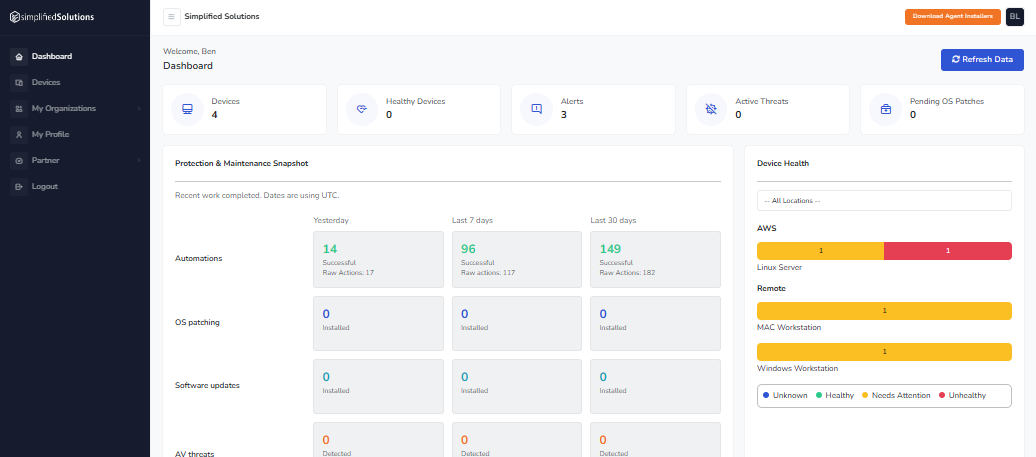
After installation is complete, return to the Simplified Solutions dashboard. Within a short period of time, the newly enrolled device should appear in your device list.
The dashboard will show the device’s status, confirming that it is online and reporting correctly. From this point forward, the device will continue to receive updates, monitoring, and protection automatically.
If the device appears and shows an active status, setup is complete. Your first device is now protected.