Viewing Invoices
This document explains how to view invoices and billing history in Simplified Solutions. The Billing page provides full visibility into past and current invoices, including detailed daily usage information.
Only users with administrator access can view invoices and billing details.
Accessing the Billing Page
To view invoices, navigate to My Organizations > Billing.
This page displays billing information for the currently active Organization.
Invoice Details
The invoice detail view provides a breakdown of how charges were calculated for the billing period.
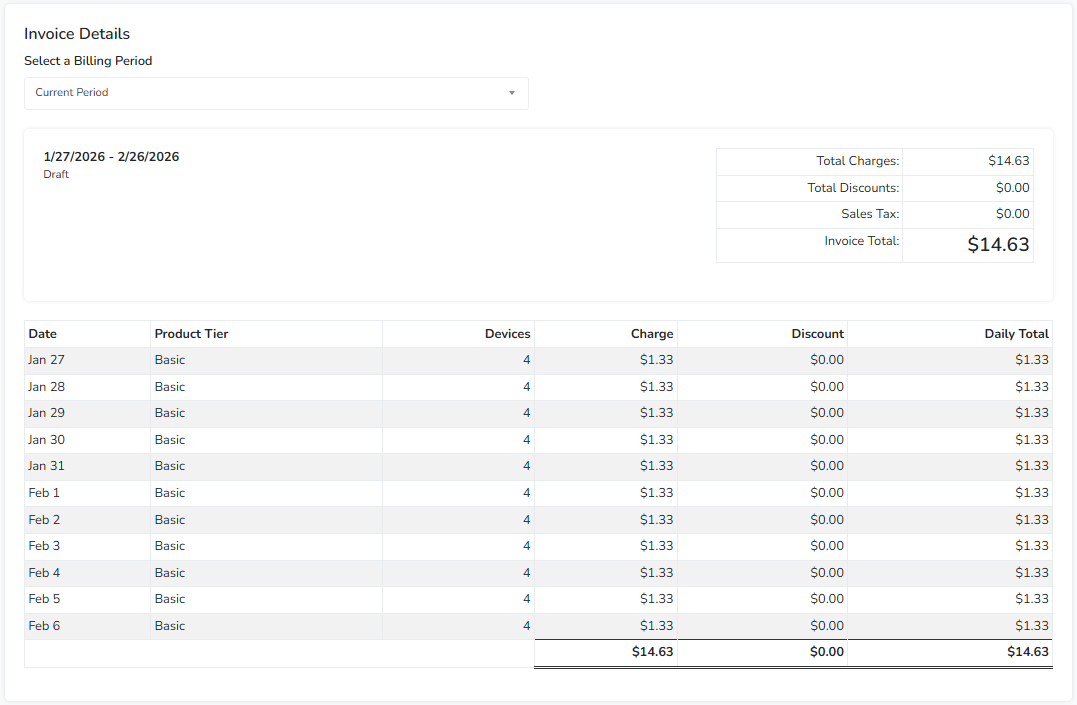
This view includes:
- A summary of total charges, discounts, and taxes.
- A daily breakdown showing the number of active devices and charges for each day.
- Line items reflecting changes in device counts or subscription tier during the period.
The daily breakdown allows you to see exactly how usage changed over time and how those changes affected the invoice total.
Invoice History
The invoice detail view let's you view history by changing the billing period.
Use the dropdown to select a previous billing period to see the detail for that invoice, including the payment status.
Understanding Daily Charges
Daily charges are calculated based on the number of active devices and the subscription tier in effect for each day.
If devices are added, removed, or if the subscription tier changes during a billing period, those changes are reflected in the daily line items.
This level of detail is intended to make billing transparent and easy to understand.