Removing a Device
This document explains how to remove a device from Simplified Solutions. Removing a device ensures that it is no longer monitored, protected, or included in billing once it is no longer in use.
Device removal is intentionally designed as a two-step process. This provides immediate visibility and billing accuracy while allowing time for the underlying removal to be completed safely.
Starting the Removal Process
Device removal begins from the device details page. Select Queue for Delete from the Device Actions dropdown.
This action takes you to a confirmation screen where you can review the request before proceeding.
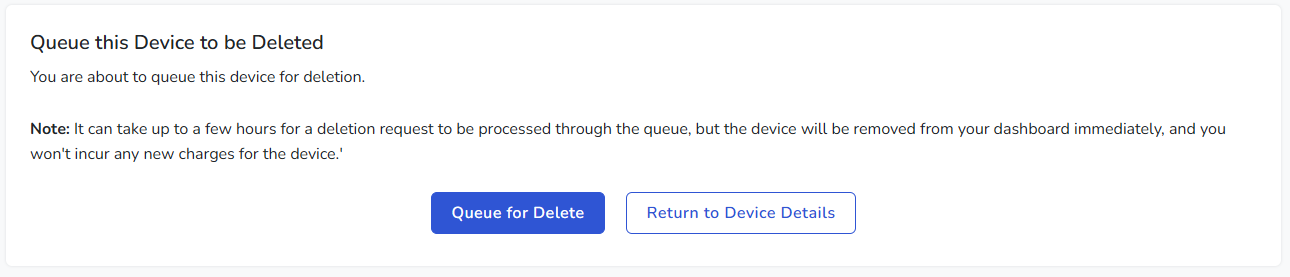
Confirming Device Deletion
On the confirmation page, you are asked to confirm that you want the device to be deleted. This step helps prevent accidental removal.
Once confirmed, the device is immediately marked as queued for deletion.
At this point:
- The device is removed from active dashboard views.
- The device is no longer counted for billing.
- Monitoring and management activity stops from the platform perspective.
Deletion Processing
Although the device is removed from the dashboard right away, the actual deletion process runs in the background and may take several hours to complete.
During this time, the system coordinates removal with the underlying management platform, including uninstalling the agent and any managed components such as antivirus or backups.
Canceling a Deletion Request
While a device is queued for deletion, you still have the option to cancel the request.
If you return to the device list, the device will appear with a clear indication that it is queued for deletion.
Opening the device details page during this period displays a banner at the top of the page indicating that the device is scheduled for deletion.
From this banner, you can cancel the deletion request. If canceled, the device will return to normal management and monitoring.
When to Remove a Device
Devices should be removed when they are permanently retired, replaced, or no longer belong to your Organization.
Removing unused devices helps keep your dashboard accurate and ensures that billing reflects only active, protected systems.